


SEO Title: Do Car Night Vision Systems Need a Separate Display?
- The Short Answer
- What a Car Night Vision System Actually Shows
- Display Included, Display Compatible, and Display Required
- Dedicated Display Versus an Integrated Screen
- Advantages of a Dedicated Night Vision Screen
- Advantages of Using an Existing Vehicle Display
- Advantages and Limits of a Phone-Based Display
- How to Choose the Right Screen Arrangement
- 1. Confirm the Package Contents
- 2. Check Video and Electrical Compatibility
- 3. Evaluate Latency and Image Fluidity
- 4. Choose a Sensible Screen Size
- 5. Plan the Mounting Position Before Buying
- 6. Assess Alert Design, Not Just Video Quality
- A Practical Decision Framework
- Choose a Complete Kit With a Dedicated Display When:
- Consider Factory-Screen Integration When:
- Consider a Phone or Tablet When:
- Buy a Camera-Only Package When:
- Real-World Use Cases That Affect the Decision
- Rural and Forest Roads
- Highway Driving
- City Traffic
- Family Cars and Shared Vehicles
- Fog, Rain, Snow, and Glare
- Installation and Ownership Considerations
- Common Buying Mistakes
- Assuming the Pictured Screen Is Included
- Choosing the Highest-Resolution Monitor
- Ignoring Startup Time
- Overlooking Nighttime Brightness
- Expecting Night Vision to Replace Headlights
- Installing the Screen in an Unsafe Position
- Focusing on the Screen but Ignoring Detection Quality
- Safety Boundaries Every Buyer Should Understand
- Questions to Ask Before Placing an Order
- Frequently Asked Questions
- Can I connect a car night vision camera to my factory infotainment screen?
- Is a separate screen safer than using a phone?
- Can I use my reversing-camera monitor for night vision?
- Where should a night vision display be mounted?
- Does a bigger display improve hazard detection?
- Will thermal night vision work in fog or heavy rain?
- Conclusion
Meta Description: Learn when a car night vision display is required, how integrated and separate screens compare, and what to check before buying an aftermarket system.
A Car Night Vision Display is the screen that shows the road image, detected hazards, and system alerts produced by a night vision camera. Whether you need to buy one separately depends on the system: some aftermarket kits include a dedicated screen, some can connect to a compatible factory display, and others use a smartphone or supported infotainment unit. Before buying, confirm exactly what is included and how the image will be presented. A powerful camera is of limited practical value if its output is difficult to see, delayed, distracting, or incompatible with your vehicle.
The Short Answer
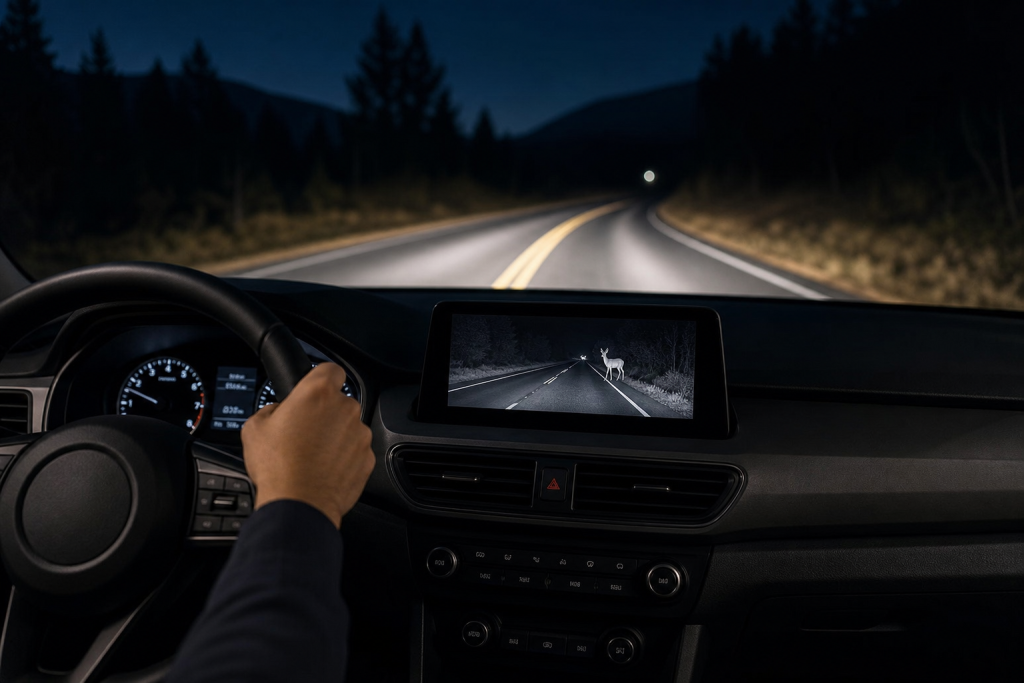
You do not always need to purchase a separate display when buying a car night vision system. You do, however, need a suitable way to view its output.
The correct setup generally falls into one of four categories:
- A complete kit with its own dedicated screen
- A camera module that connects to a compatible factory display
- A system that uses an existing aftermarket head unit
- A wireless or app-based system that displays video on a phone or tablet
A dedicated screen is often the most straightforward option for an aftermarket thermal imaging system because the camera and display are designed to work together. An integrated arrangement can look cleaner, but compatibility and installation may be more complicated. A phone-based solution may reduce dashboard hardware, although connection reliability, screen wake behavior, notifications, and device temperature can affect usability.
More EV News
The key buying question is therefore not simply, “Does it have a display?” It is, “Can this system provide a clear, timely, and conveniently positioned view in my specific vehicle?”
What a Car Night Vision System Actually Shows
Automotive night vision is intended to supplement what the driver can see through the windshield and headlights. Depending on the design, a system may use thermal imaging, near-infrared illumination, or another low-light camera technology.
A thermal imaging system detects differences in emitted heat rather than relying entirely on visible light. This can make warm pedestrians and animals more distinguishable against cooler surroundings. It may also help reveal the position of vehicles or other objects, although the appearance and detection behavior depend on the hardware and software.
Near-infrared systems work differently. They generally illuminate or capture a scene using infrared wavelengths and produce an image that may resemble a monochrome camera view. Their performance can be affected by weather, reflective surfaces, and the limits of their illumination range.
The screen may show:
- A live forward-facing road image
- Highlighted pedestrians or animals
- Vehicle or obstacle recognition markers
- Visual warning boxes or icons
- System status and camera information
- Recording indicators, where supported
- Audible-alert controls or sensitivity settings
Not every product offers all these functions. A night vision camera that supplies only raw video is different from a driver-assistance system that analyzes the image and generates real-time alerts.
Display Included, Display Compatible, and Display Required
Product listings often use similar language for very different packages. Understanding three terms can prevent an incomplete or unsuitable purchase.
Display Included
A “display included” kit normally contains a camera, monitor, power and video cables, mounting hardware, and any control unit required for operation. This is generally the easiest package to evaluate because the manufacturer has paired the major components.
Even then, check whether small installation items are included. Cable-routing supplies, vehicle-specific brackets, adapters, or professional calibration may still be additional requirements.
Display Compatible
“Display compatible” means the system can work with certain screens, but it may not include one. Compatibility could require a particular video input, signal format, adapter, interface module, operating system, or app.
Do not assume that a factory infotainment screen can accept an aftermarket camera feed simply because it already displays a reversing camera. Rear-camera inputs may activate only when reverse gear is selected, and factory systems often use proprietary connections or communication protocols.
Display Required
A “display required” camera kit provides an image source but expects the buyer to supply the monitor or head unit. This option can suit custom installations, commercial vehicles, or cars that already have a compatible display.
The risk is that technical specifications may appear compatible on paper while the actual installation introduces image scaling, startup delays, intermittent connections, or awkward controls. Confirm compatibility with the system seller or a qualified vehicle electronics installer before purchasing components separately.
Dedicated Display Versus an Integrated Screen
Neither approach is universally superior. The better choice depends on your vehicle, dashboard layout, driving conditions, and tolerance for installation complexity.
Advantages of a Dedicated Night Vision Screen
A dedicated screen is designed for one main task. It can remain ready without requiring the driver to navigate infotainment menus or open an app. Systems sold as complete packages also reduce uncertainty about resolution, video signal compatibility, and alert presentation.
Other practical benefits include:
- Predictable startup and controls
- Continuous access to the forward camera view
- No interruption from calls or phone notifications
- Placement independent of the central infotainment screen
- Easier removal or replacement than a modified factory display
- A consistent interface developed for the paired camera
This arrangement can be particularly practical in an older vehicle without a modern infotainment system. It may also suit drivers who frequently use rural roads and want a persistent view rather than a feed hidden behind another screen function.
The disadvantage is additional dashboard hardware. A poorly positioned monitor can obstruct the windshield, interfere with air vents, reflect in the glass, or encourage the driver to look too far away from the road.
Advantages of Using an Existing Vehicle Display
Using an existing screen can produce a cleaner cabin and reduce the number of mounted devices. The central screen may also be larger than the compact monitor supplied with some kits.
However, integration is not always simple. Questions to investigate include:
- Does the screen accept a continuous external video input?
- Can the feed be opened without several menu selections?
- Will navigation, parking cameras, or vehicle settings interrupt it?
- Are visual warnings preserved through the interface?
- Does an adapter introduce noticeable delay?
- Will modifying the system affect other vehicle functions?
- Can the screen show the feed while the vehicle is moving?
Installation rules and restrictions differ by vehicle and jurisdiction. Any interface should be installed responsibly and should not disable legally required functions or essential safety warnings.
Advantages and Limits of a Phone-Based Display
A smartphone is already familiar, portable, and easy to mount. App-based systems may also offer software updates and recording access without another permanent monitor.
For routine night driving, though, a phone is not always the most dependable display. Incoming calls, battery management, screen-lock settings, app permissions, wireless interference, and overheating can interrupt the view. A driver may also forget to mount or connect the device before setting off.
A phone-based solution makes the most sense when the system has a stable connection, automatic startup behavior, a well-designed driving interface, and a mount that does not obstruct the road.
How to Choose the Right Screen Arrangement
The decision should be based on the complete driving experience, not screen size alone.
1. Confirm the Package Contents
Look for a precise list of included components. Product images sometimes show a monitor even when it is sold separately. Verify whether the package contains:
- Camera
- Display
- Camera control or processing unit
- Wiring harness
- Power adapter
- Video cable or wireless module
- Camera and monitor mounts
- Vehicle interface adapter
- Installation instructions
Also determine whether pedestrian detection, animal detection, or alert functions are built into the camera, processed by a separate module, or dependent on an app.
2. Check Video and Electrical Compatibility
When using your own monitor, both devices need compatible connections and signal formats. A matching physical plug does not necessarily mean the equipment can communicate correctly.
Check resolution, frame rate, aspect ratio, input type, and voltage requirements. Ask whether the image will fill the display correctly and whether alerts, menus, or overlays remain visible. Cable length also matters because the camera is normally installed near the front of the vehicle while the display sits in the cabin.
Vehicle electrical systems can be sensitive. Improper power connections may cause battery drain, electrical faults, radio interference, or unreliable startup. Professional installation is sensible when hardwiring, removing interior trim, routing a cable through the firewall, or interfacing with factory electronics.
3. Evaluate Latency and Image Fluidity
Latency is the delay between an event occurring ahead and appearing on the screen. Excessive delay reduces the usefulness of the display, particularly when the vehicle is moving quickly.
Wireless transmission can make installation easier, but signal stability and delay deserve scrutiny. A wired connection is not automatically perfect, yet it generally avoids some sources of wireless interruption.
Frame rate also affects how natural motion appears. Choppy video can make it harder to judge the direction or movement of a pedestrian, cyclist, animal, or vehicle. Buyers should consider overall responsiveness rather than relying only on a high advertised screen resolution.
4. Choose a Sensible Screen Size
A larger display is not automatically safer. It may make details easier to recognize, but it also occupies more space and can create more reflected light inside the cabin.
The screen should be large enough to interpret quickly without requiring prolonged attention. It should also have controls that are usable without navigating small menus while driving.
Brightness adjustment is essential. A monitor that looks impressive during the day may be uncomfortably bright on an unlit road. Automatic dimming or an accessible nighttime setting can help preserve the driver’s natural low-light vision.
5. Plan the Mounting Position Before Buying
Sit in the normal driving position and identify possible mounting locations. Consider the display’s full dimensions, cable exit points, bracket movement, and the path required to route wiring.
The monitor should not:
- Block the driver’s forward view
- Obscure mirrors or instruments
- Cover warning lights or vehicle controls
- Interfere with airbags
- Create a prominent windshield reflection
- Require a long downward glance
- Become a loose object during sudden braking
A location near the driver’s natural line of sight can reduce glance time, but it must not obstruct the road. A center-mounted display may be less intrusive, although the driver will need to look farther away from the forward scene. The best balance varies by cabin design.
6. Assess Alert Design, Not Just Video Quality
A detailed thermal image may still demand too much interpretation. Detection boxes, clear warning symbols, and sensible audible alerts can make a system easier to use because the driver does not need to continuously study the screen.
Too many alerts can become distracting, however. Check whether the system distinguishes relevant road hazards from roadside objects and whether alert volume or sensitivity can be adjusted. No detection system will identify every hazard correctly in every environment, so alerts must remain supplementary.
A Practical Decision Framework
Use the following scenarios to narrow the choice.
Choose a Complete Kit With a Dedicated Display When:
- Your vehicle lacks a compatible screen.
- You want fewer interface and signal-format uncertainties.
- The night vision feed needs to remain continuously accessible.
- You prefer a system whose camera and monitor were designed together.
- You do not want to depend on a personal phone.
- A suitable, unobstructed mounting location is available.
Consider Factory-Screen Integration When:
- A confirmed vehicle-specific interface is available.
- You want to minimize visible dashboard hardware.
- The feed can be accessed quickly while driving.
- Important alerts and image overlays remain functional.
- A qualified installer can complete the integration without compromising vehicle systems.
Consider a Phone or Tablet When:
- The system officially supports the device and operating system.
- Connection latency is acceptably low.
- The app starts reliably and remains visible.
- Notifications and screen locking can be managed safely.
- You are comfortable mounting and connecting the device for every journey.
Buy a Camera-Only Package When:
- You already own a verified compatible monitor.
- You understand the required video and power connections.
- You are building a custom installation.
- The total cost remains competitive after adapters, mounts, cables, and labor.
Real-World Use Cases That Affect the Decision
Rural and Forest Roads
On unlit rural routes, animals and pedestrians may appear beyond the most strongly illuminated area of the headlights or emerge from vegetation. A dedicated screen with clear thermal contrast and timely alerts can support awareness, but the display should not become the driver’s main view of the road.
This is also a setting where screen position matters. Repeatedly looking down toward a center console can consume attention precisely when scanning road edges is important.
Highway Driving
At highway speeds, distance closes quickly. Image latency, detection range, warning timing, and a stable mount matter more than decorative screen features. Drivers should preserve a safe following distance and adapt speed to the distance they can see and stop within.
City Traffic
Streetlights, signs, cyclists, pedestrians, parked vehicles, and other displays create a visually busy environment. An always-on monitor may add clutter if alerts are poorly prioritized. A system with clear hazard highlighting can be more useful than one that merely provides another camera image.
Family Cars and Shared Vehicles
A permanent screen may be easier for multiple drivers because it does not require pairing each person’s phone. Before installation, ensure that the display does not block passenger airbag deployment areas and that cables cannot be pulled by children or interfere with routine cabin use.
Fog, Rain, Snow, and Glare
Thermal imaging can support awareness in some poor-visibility conditions, but it cannot make adverse weather harmless. Heavy precipitation, contaminated camera lenses, spray, and environmental conditions can reduce image quality. Conventional low-light cameras may struggle with glare or may depend more heavily on available illumination.
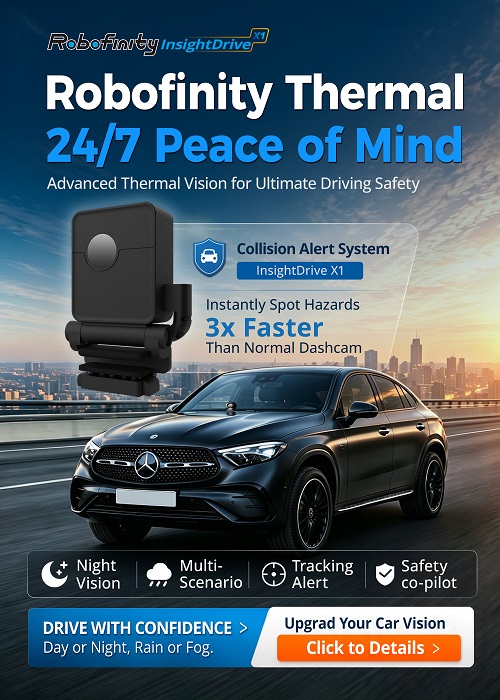
Robofinity InsightDrive is one example of an aftermarket vehicle thermal imaging night vision system that pairs a 6.25-inch screen with AI-assisted recognition of pedestrians, animals, and vehicles. That type of integrated package illustrates why buyers should evaluate the camera, processing, alerts, and display as one system rather than treating the monitor as an unrelated accessory.
Installation and Ownership Considerations
The purchase price is only one part of ownership. A custom display interface may require adapters and more installation labor than a self-contained kit. A low-cost camera-only product may therefore become more expensive once a suitable monitor, cables, mounting hardware, and professional fitting are added.
The exterior camera needs a position with a clear view ahead. It should not be installed where normal vehicle components obscure it or where road debris can easily damage it. The mount must remain stable because vibration can make the image difficult to interpret.
Maintenance is usually straightforward but important:
- Keep the camera lens or protective window clean.
- Inspect exposed wiring and mounts periodically.
- Check the display before a long nighttime trip.
- Investigate flickering, delayed startup, or intermittent video.
- Install software updates only through the supported process.
- Recheck camera alignment after front-end repairs or impacts.
- Remove or secure portable displays when the vehicle is unattended.
If the image freezes, becomes badly misaligned, or repeatedly drops out, do not rely on it. Have the camera, wiring, power supply, and display connection inspected.
Common Buying Mistakes
Assuming the Pictured Screen Is Included
Always rely on the written package list, not promotional images. Look for explicit wording that identifies the display as an included component.
Choosing the Highest-Resolution Monitor
Resolution matters only when the camera output and processing can support it. Contrast, latency, brightness control, alert clarity, and viewing position may have a greater effect on everyday usability.
Ignoring Startup Time
A system that requires repeated pairing or several menu steps may not be used consistently. Ask how the feed activates and how long it takes to become available after starting the vehicle.
Overlooking Nighttime Brightness
An excessively bright display can cause glare and make the darker road outside harder to see. Check for manual or automatic dimming before purchase.
Expecting Night Vision to Replace Headlights
A night vision image does not replace correctly functioning headlights or careful visual scanning. It also does not change stopping distance or road conditions.
Installing the Screen in an Unsafe Position
A convenient suction-cup location may block part of the windshield or sit in an airbag deployment zone. Plan the mount before ordering and use secure, vehicle-appropriate hardware.
Focusing on the Screen but Ignoring Detection Quality
A large, attractive monitor cannot compensate for weak camera performance, delayed processing, or unreliable alerts. Evaluate the system as a complete chain: camera, processor, connection, display, interface, and mounting.
Safety Boundaries Every Buyer Should Understand
Vehicle night vision is driver-assistance technology. It can provide another source of information, but it does not take control of the vehicle or remove the need for judgment.
Drivers must continue to use headlights, mirrors, and direct observation. Speed should suit the weather, traffic, and visible stopping distance. Safe following distance, proper braking, attention to vulnerable road users, and compliance with traffic laws remain essential.
Do not stare at a live video feed. The road itself must remain the primary visual reference. Treat the display as you would a mirror or instrument: glance briefly when useful, then return attention ahead.
Detection and classification can also be imperfect. Environmental temperature, rain, snow, spray, road geometry, dirty lenses, partial obstructions, and the size or position of an object may affect what the system presents. A missing alert does not mean the road is clear, and an alert does not always mean a collision is imminent.
Questions to Ask Before Placing an Order
A short pre-purchase checklist can reveal whether you are buying a complete, usable system:
- Is the display included in the listed package?
- If not, which exact displays and video inputs are supported?
- Does the system provide raw video, hazard recognition, or both?
- Are visual alerts preserved on an external or factory screen?
- How does the display activate when the vehicle starts?
- Is the connection wired or wireless?
- Can brightness be reduced sufficiently for dark roads?
- Is there a suitable mounting point that does not obstruct the view or airbags?
- What installation parts are included?
- Is professional hardwiring or vehicle integration required?
- Can the camera position be adjusted and secured?
- What maintenance and software support does the system require?
Clear answers to these questions are more useful than comparing camera specifications in isolation.
Frequently Asked Questions
Can I connect a car night vision camera to my factory infotainment screen?
Possibly, but only if the vehicle and camera have a compatible interface. Many factory screens cannot accept a continuous aftermarket video feed without a vehicle-specific adapter. Confirm whether alerts and overlays will also work.
Is a separate screen safer than using a phone?
It can be more reliable because it is dedicated to the system and is not interrupted by calls, notifications, battery settings, or app switching. Safety still depends heavily on secure placement, suitable brightness, and brief glances rather than continuous viewing.
Can I use my reversing-camera monitor for night vision?
Only if the monitor supports the night vision camera’s signal and can show the feed while driving forward. Some reversing-camera inputs operate only when reverse gear is selected, so electrical and operational compatibility must be verified.
Where should a night vision display be mounted?
Mount it where it can be checked with a short glance without blocking the windshield, mirrors, instruments, controls, or any airbag deployment area. The ideal position depends on the vehicle’s dashboard and local requirements.
Does a bigger display improve hazard detection?
Not necessarily. A larger screen may make details easier to see, but camera quality, thermal contrast, processing, latency, alerts, and positioning also matter. An oversized or overly bright screen may create distraction.
Will thermal night vision work in fog or heavy rain?
It may provide useful additional information in some poor-visibility conditions, but performance is not unlimited. Dense weather, water, spray, snow, lens contamination, and environmental temperature can affect the image. Drivers must still reduce speed and use appropriate lights.
Conclusion
A separate display is necessary only when the chosen night vision camera cannot use a suitable screen already in the vehicle. For many aftermarket buyers, a complete kit with a dedicated monitor is the simplest and most predictable arrangement. Factory-screen integration can preserve a clean dashboard, while a phone-based display may suit occasional use, but both require careful compatibility and usability checks.
Evaluate the entire system before deciding: camera technology, hazard recognition, video latency, screen brightness, mounting position, startup behavior, wiring, installation cost, and ongoing support. Most importantly, choose a display arrangement that delivers useful information without competing with the road for attention. Night vision can support nighttime road awareness, but safe speed, functioning headlights, adequate braking distance, and attentive driving remain the foundation of safety.